Send a configuration to the logger
Put a configuration on the logger so that it starts working with it. The configuration on the logger is replaced.
Before you start
- The logger is connected and the status bar shows
CONNECTED. If two loggers are plugged in, check that the serial number in the status bar is the one you mean: see Connect a logger and switch between loggers. - Back up what is on the logger first:
Config ▸ Logger ▸ Save Logger Configuration To File. - Download any logs you still need. See Download logs from the logger.
- The project is open and saved. See Create a configuration.
Steps
Click
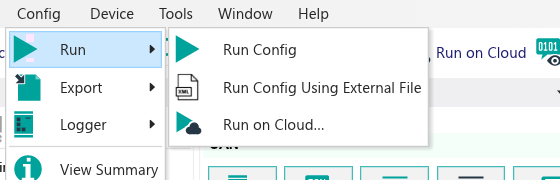
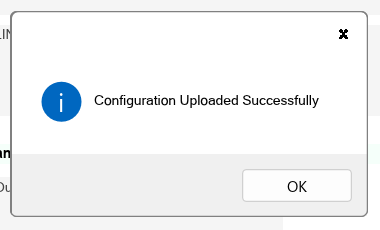
Runon the toolbar, or chooseConfig ▸ Run ▸ Run Config.The configuration is sent at once. A message reads
Configuration Uploaded Successfully.Click
OK.The status bar shows
Configuration: <project name>.
If the project has not been saved, REXDESK asks first: Project is not saved. What do you want to do? Choose Save Project or Continue without saving, as: and click OK. Cancel sends nothing.
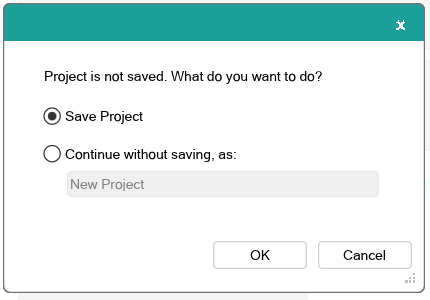
Run does not ask for confirmation when the project is saved. The moment you click it, the configuration on the active logger is replaced.
Check the result
Choose
Device ▸ Logger Information.The top line reads
Configuration uploaded, andActive configuration ▸ Nameshows the project name with a newGUID.- To see data arriving, click
Liveon the toolbar and thenOnline. See View live data.
If nothing is connected to the logger's buses, Live Data reports: "Online · no data yet (7 s). Check that the logger's configuration sends data to USB/Wi-Fi (Live) and that its buses or sensors are active."
Send a configuration from a file
Config ▸ Run ▸ Run Config Using External File sends an .rxc or .xml file without opening it as a project. Use it to put a backup back.
Troubleshooting
| Symptom | Cause | What to do |
|---|---|---|
Run is grey | No logger is connected, or another task is using it | Close Internal Storage, Live Data or LTE Check and wait for CONNECTED |
Validation of the configuration failed: configuration: external RXC block at byte 60: block fields are incomplete or have extra data after Run Config Using External File | The file is a logger's empty default configuration saved with Save Logger Configuration To File. REXDESK does not accept it back | Nothing was sent. Use the command line instead: close REXDESK and run rexdesk-cli configure -I <file>.rxc --serial <serial>, which answers Configuration sent successfully |
| The status bar still shows the old configuration name | The upload did not finish | Read the message that appeared and send again |
Related
---
Written for REXDESK 1.0.0.791 (23 Nov 2026).