Configure, calibrate and monitor.
K-CAL is the free companion software for all K-Series instrumentation modules. Set up CAN outputs, view live sensor data on the built-in oscilloscope and export DBC files.
5
Simultaneous devices
K, J, T
Thermocouple types
DBC
Export format
Live
Built-in oscilloscope
Built for instrumentation engineers
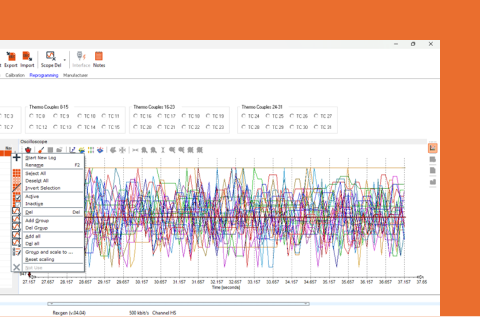
Built-in oscilloscope
View live sensor data from connected K-Series devices in real time. Verify configuration accuracy before deployment. Export oscilloscope data to CSV, MAT and DAT formats.
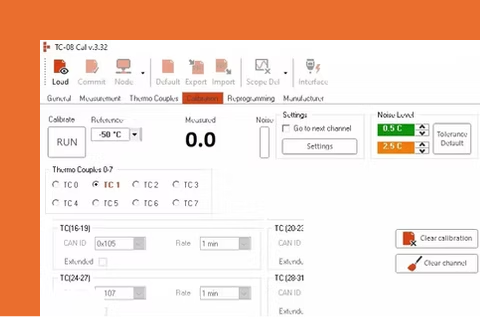
Professional calibration
Calibrate K-Series thermocouple and sensor devices with traceable certification. Built-in calibration workflow maintains accuracy to within ±1°C for thermocouples.
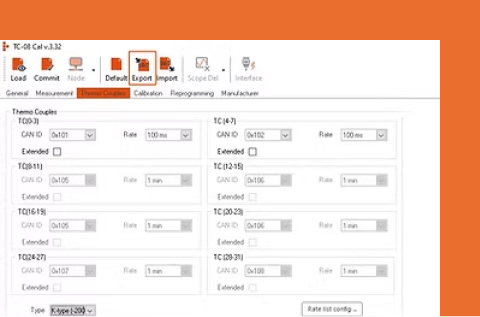
DBC file export
Generate industry-standard DBC files for any K-Series device, including custom channel names. Combined multi-device DBC files merge all connected modules into a single database.
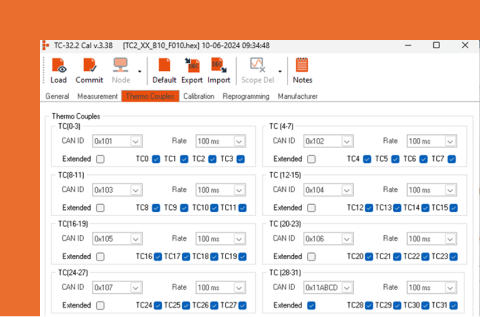
Multi-device channel configuration
Configure up to five K-Series devices simultaneously. Set thermocouple types (K, J, T), byte orders, baud rates and sampling rates per channel. CAN identifiers auto-assigned to avoid conflicts.
Three steps from setup to measurement
Connect and configure
Connect via USB, set baud rate and byte order, configure thermocouple types per channel. Enable WakeOnCAN sleep mode for unattended deployments.
Verify with live data
Switch to the oscilloscope tab to view live sensor data. Confirm readings are within expected ranges. Adjust configuration while viewing results in real time.
Export DBC and deploy
Export a DBC file for the configured device. For multi-device setups, generate a combined DBC. Import into REXDESK or DIALOG to decode CAN data during logging.
03 Compatibility
Works with the full K-Series range
Supported hardware
- K-TC (8 and 16 channel thermocouple)
- K-Box (multi-DAQ: thermocouple + analogue + digital)
- K-AN8 (8-channel analogue + digital/PWM)
- K-Volt (voltage measurement)
- K-IEPE (vibration/accelerometer)
Data logger integration
- REXGEN series (via CAN bus + DBC)
- REBEL series (via CAN bus + DBC)
- Any third-party CAN logger (standard DBC)
- Galvanic isolation between modules
- Stackable on shared CAN bus
Supported K-Series modules

K-TC
Thermocouple to CAN module in 8, 16 or 32 channel versions for K, J and T types. ±1°C accuracy from -200°C to...
From £1,299 ex VAT £1,558.80 inc VAT
View →
K-BOX
8 thermocouple and 8 analog inputs in one stackable CAN module. 1kHz analog sampling, ±80V ranges, sensor power outputs and isolation throughout.
£1,599 ex VAT £1,918.80 inc VAT
View →
K-AN8
8-channel analog to CAN module with PWM, frequency and counter inputs. ±80V to ±10V ranges, ±0.0015% accuracy, engineering units on the bus.
£1,149 ex VAT £1,378.80 inc VAT
View →04 FAQ
Common questions
Is K-CAL free?
Can K-CAL configure multiple devices at once?
What thermocouple types does K-CAL support?
Can I export data from the K-CAL oscilloscope?
Does K-CAL generate DBC files?
Can Influx Technology calibrate my devices?
Download K-CAL
Free for all K-Series users. No licence, no subscription.
Free for all K-Series users
Need help getting started?
Documentation portal with K-Series user guides, calibration procedures and firmware downloads.