Update the logger firmware
Bring a logger up to the firmware supplied with REXDESK. REXDESK tells you when the connected logger is behind, and updating takes about a minute.
Before you start
- The logger is connected over USB and has a stable power supply.
- Back up the configuration:
Config ▸ Logger ▸ Save Logger Configuration To File. See Read the configuration that is on the logger. - Download any logs you need. See Download logs from the logger.
- If two loggers are plugged in, make sure the one you want to update is the active one. See Connect a logger and switch between loggers.
How you know an update is available
- The status bar shows the firmware in red:
Firmware: 3.84.0 RC - Out of date. - The
Internal Storagewindow showsFirmware 3.89.23 is availablewith anUpdate to latest…button.

Steps
- Choose
Device ▸ Logger Information. Click
Update to latest….A
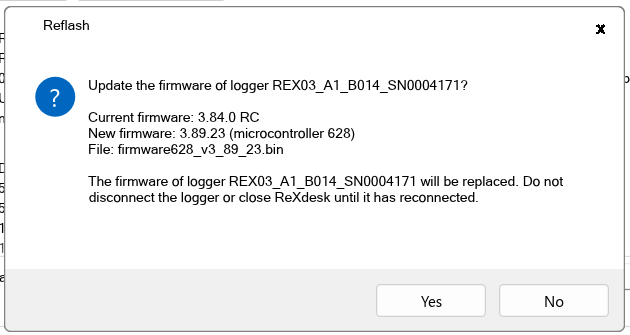
Reflashquestion names the logger, itsCurrent firmware, theNew firmwarewith its microcontroller, and theFile.Check that the serial number is the logger you mean to update, then click
Yes.Nocancels and sends nothing.The window shows
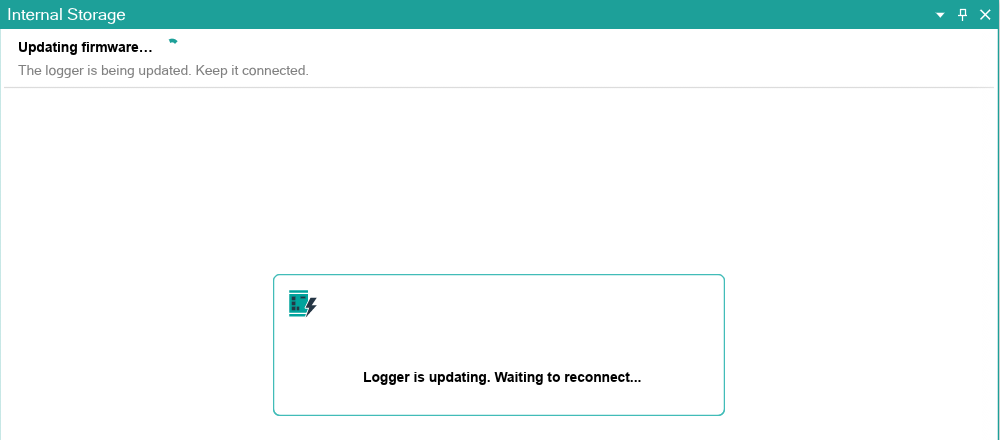
Updating firmware…and "The logger is being updated. Keep it connected.", thenLogger is updating. Waiting to reconnect….Wait. Do not unplug the logger and do not close REXDESK.
After about 40 seconds the logger reconnects and a message reads
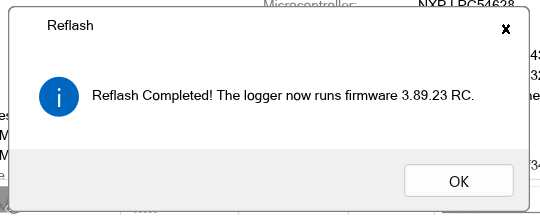
Reflash Completed! The logger now runs firmware 3.89.23 RC.Click
OK.The status bar shows the new firmware version in the normal colour.
What you should see
Logger information ▸ Firmware ▸ Version reads the new version. The configuration on the logger and the logs on the SD card are unchanged.
Notes
Do not disconnect the logger or close REXDESK until it has reconnected. If an update seems to have failed, leave the logger connected and powered for ten minutes before you do anything else.
If a second logger is plugged in, the Select Active USB Logger window appears when the updated logger restarts. The updated logger is already selected: click OK. The Reflash Completed! message is behind that window.
To install a specific firmware file instead, choose Device ▸ Reflash and pick the .bin or .zip file. REXDESK checks that the file matches the logger's microcontroller before it asks for confirmation.
Related
---
Written for REXDESK 1.0.0.791 (23 Nov 2026).