Settings
Choose what REXDESK does when it starts and when a logger connects, the map source, the language, the graphics API and how updates are announced.
Steps
Choose
Tools ▸ Settings.The
Settingswindow opens.- Change the options you need.
- Close the window with ✕ or Esc.
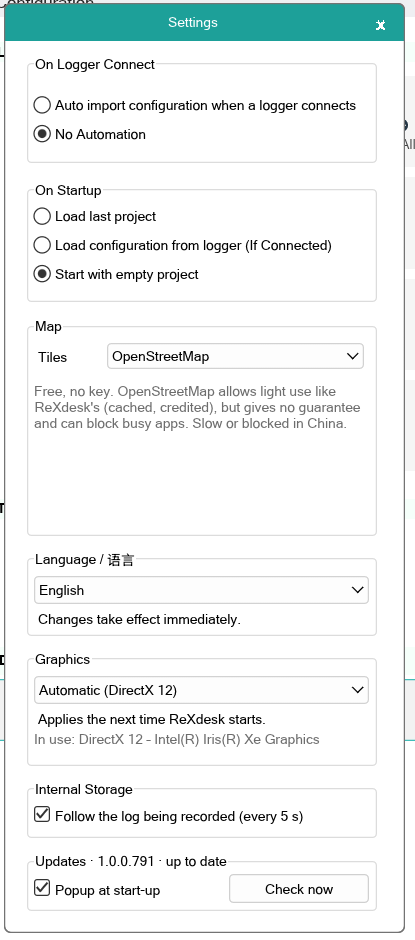
The options
| Group | Option | Effect |
|---|---|---|
On Logger Connect | Auto import configuration when a logger connects | Loads the logger's configuration into the designer each time a logger connects |
No Automation | Shows only the configuration's name in the status bar | |
On Startup | Load last project | Reopens the project you had open |
Load configuration from logger (If Connected) | Starts with the connected logger's configuration | |
Start with empty project | Starts with New Project | |
Map | Tiles | The map source for the Map views and the geofence map. OpenStreetMap is free and needs no key; the note under the list explains its limits |
Language / 语言 | English, 简体中文 | "Changes take effect immediately." |
Graphics | Automatic (DirectX 12) or a specific API | "Applies the next time REXDESK starts." The line below shows the API and graphics card in use. Change it only if the window flickers or does not draw correctly |
Internal Storage | Follow the log being recorded (every 5 s) | Keeps the log list up to date while the logger records |
Updates | Popup at start-up, Check now | The group title shows the installed version and whether it is up to date. Popup at start-up announces a newer REXDESK when the program starts |
Related
---
Written for REXDESK 1.0.0.791 (23 Nov 2026).