Convert logs that are already on the PC
Open .rxd logs that were downloaded earlier and convert them to another format, without a logger connected.
Before you start
- One or more
.rxdfiles on the PC, with the file names REXDESK gave them when they were downloaded.
Steps
Choose
Window ▸ Data Logs.The
Data Logspane opens: "Open or drop an RXD log to inspect it and export traces or decoded signals."Click
Openand choose the log.The log appears as a row with
Log name,Start time,Size,Serial,Blocks,BusesandFolder. The line at the bottom readsLog ready. Choose a format and export destination.Click
Exportand choose a format, for exampleCSV (csv).A save window opens.
Choose a folder and a file name and click
Save.The line at the bottom reads
Saved <path>.
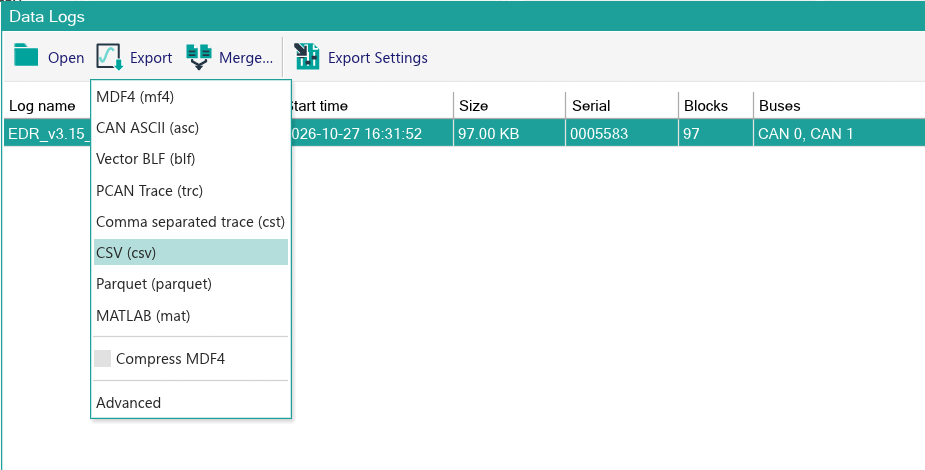
The formats
| Entry | File |
|---|---|
MDF4 (mf4) | ASAM MDF 4, for measurement tools. Compress MDF4 in the same menu makes a smaller file |
CAN ASCII (asc) | Vector ASCII trace of the raw frames |
Vector BLF (blf) | Vector binary log of the raw frames |
PCAN Trace (trc) | PEAK trace of the raw frames |
Comma separated trace (cst) | The raw frames as text |
CSV (csv) | The decoded channels, one column each |
Parquet (parquet) | The decoded channels as Apache Parquet |
MATLAB (mat) | The decoded channels for MATLAB |
Advanced | More options before exporting (not opened in this pane during the test) |
What a CSV looks like
The first line is the creation time. The second holds the channel names, starting with Time. The fifth holds the units (sec, g, dps). The data follows, one row per sample time, with a value only in the columns that were sampled at that time.
If the file was renamed
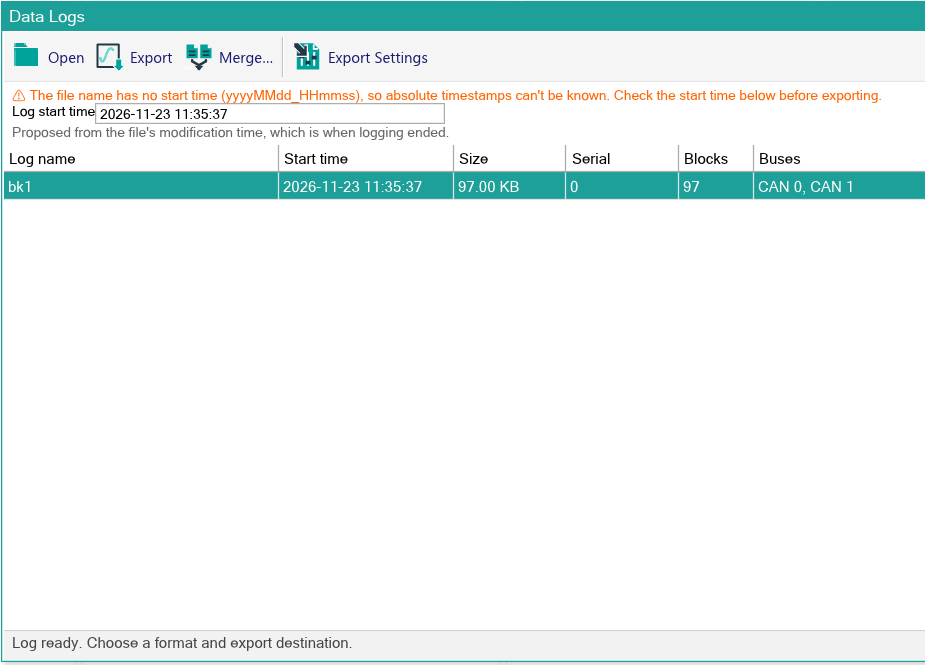
A log's start time is taken from its file name. If the name no longer ends in the date and time REXDESK gave it, a warning appears above the list:
⚠ The file name has no start time (yyyyMMdd_HHmmss), so absolute timestamps can't be known. Check the start time below before exporting.
REXDESK fills Log start time with a proposal: "Proposed from the file's modification time, which is when logging ended." Correct it if you know the real start time, or restore the original file name and open the file again.
Notes
To decode CAN frames into named signals, link a DBC file to the bus first. See Import a DBC file and link it to the buses.
The same conversion is available from the command line: rexdesk-cli convert-file -I <log>.rxd -O <output>.csv wrote the same CSV in the test.
Related
---
Written for REXDESK 1.0.0.791 (23 Nov 2026).